Docker Compose Full Stack
Introduction
At this stage of the project, our backend is fully containerized, networked, and running behind a production-grade WSGI server. What remains is completing the system by introducing the frontend as a first-class service within Docker Compose. In this lecture, we’ll move beyond running React in a development server and instead deploy it the way real production systems do: as static assets served by a dedicated web server. By the end, your frontend and backend will operate together as a unified, dockerized full-stack application with a single public entry point.
Front-End in Production
While React is developed using tools like Vite’s development server, that server is not suitable for production. In production, a React application is not a running Node process—it is a collection of static files generated during a build step. These files live inside the dist/ directory and consist of optimized HTML, CSS, and JavaScript assets. We saw this during the React CI/CD lecture, but let's review. Essentially Vites roll-up capabilities will take all of our jsx, css, and asset files and compress them into a singular directory named dist/.

Only this dist/ directory is deployment-ready. The development server exists solely to improve developer experience with hot reloading and debugging tools. In real deployments, these static assets are served by a web server optimized for performance, caching, and concurrency. This is where Nginx enters the picture. We will essentially copy and paste this dist/ directory onto Nginx and tell nginx to route all requests that don't match an api url pattern to index.html within dist/.
You can build the dist/ directory within client by running:
npm run build
Nginx
Nginx is a high-performance web server and reverse proxy commonly used as the public-facing entry point for full-stack applications. Its role is not to run application logic, but to efficiently serve static files and route incoming HTTP requests to the appropriate backend services. Think of it as a cop directing traffic in a busy intersection. If the incoming traffic information destination is api/ the cop will redirect the request to Gunicorn and all other traffic will be directed to our JavaScript logic attached to index.html.
In our full-stack architecture, Nginx has two responsibilities:
- Serve the React build artifacts (the contents of
dist/) - Proxy API requests from the frontend to the Django backend
This separation allows each component of the system to focus on what it does best: Django handles business logic and data, while Nginx handles HTTP traffic, static assets, and routing.
Nginx Configuration
Below is the Nginx configuration used in this project:
server {
    listen 80 default_server;
    listen [::]:80 default_server;

    index index.html;

    location /api/ {
        proxy_pass http://backend:8000/api/;
        proxy_set_header Host $host;
        proxy_set_header X-Real-IP $remote_addr;
    }

    location / {
        root /usr/share/nginx/html;
        try_files $uri /index.html;
    }
}
Breaking it Down
The server block defines a virtual server that listens on port 80, making Nginx the public entry point to the entire application stack.
The /api/ location block defines a reverse proxy. Any request that begins with /api/ is forwarded to the Django backend service at http://backend:8000. The hostname backend is resolved automatically through Docker Compose’s internal network, using the service name defined in docker-compose.yml. This allows containers to communicate without exposing backend ports publicly.
The root / location serves static files from /usr/share/nginx/html, which is where our React build artifacts will live inside the container. The try_files directive ensures that client-side routing works correctly by falling back to index.html for any unknown path—an essential requirement for single-page applications.
Docker Compose Front-End
With Nginx configured, we now need to define how the frontend is built and deployed as part of our Compose stack.
client/Dockerfile
The frontend Dockerfile uses a multi-stage build to separate the build process from the final runtime image:
FROM node:18 AS build

WORKDIR /app

COPY package*json ./
RUN npm install

COPY . .
RUN npm run build

FROM nginx:alpine

COPY --from=build /app/dist /usr/share/nginx/html
In the first stage, Node is used to install dependencies and build the React application. This produces the optimized dist/ directory.
In the second stage, we discard Node entirely and switch to a lightweight Nginx image. Only the compiled static assets are copied into the final container. This results in a smaller, faster, and more secure image that closely mirrors real production deployments.
docker-compose.yml
The frontend service is added to Docker Compose as follows:
nginx:
  build: ./client
  container_name: nginx-container
  ports:
    - "80:80"
  volumes:
      - ./nginx/default.conf:/etc/nginx/conf.d/default.conf
      - ./client/dist:/usr/share/nginx/html
  depends_on:
    - backend
This service builds the frontend image using the Dockerfile in ./client. Port 80 on the host is mapped to port 80 in the container, making Nginx the single public interface to the application.
The Nginx configuration file is mounted into the container, allowing us to adjust routing behavior without rebuilding the image. The depends_on directive ensures the backend service is started before Nginx, reinforcing the dependency chain within the stack.
At this point, the frontend does not need direct access to the database or Django internals. All communication flows through HTTP, just as it would in production.
Developing within Nginx
You may have noticed we have a volume to the dist directory and this is intentionally built so we can still work on our application and delivering the newest state of our application to Nginx. We can continuously build the dist/ directory by running the following within our client project:
npm run watcher
Now as you develop your application, nginx will always have the newest version of your project being served. Just simply refresh the page and you'll see your live updates.
Conclusion
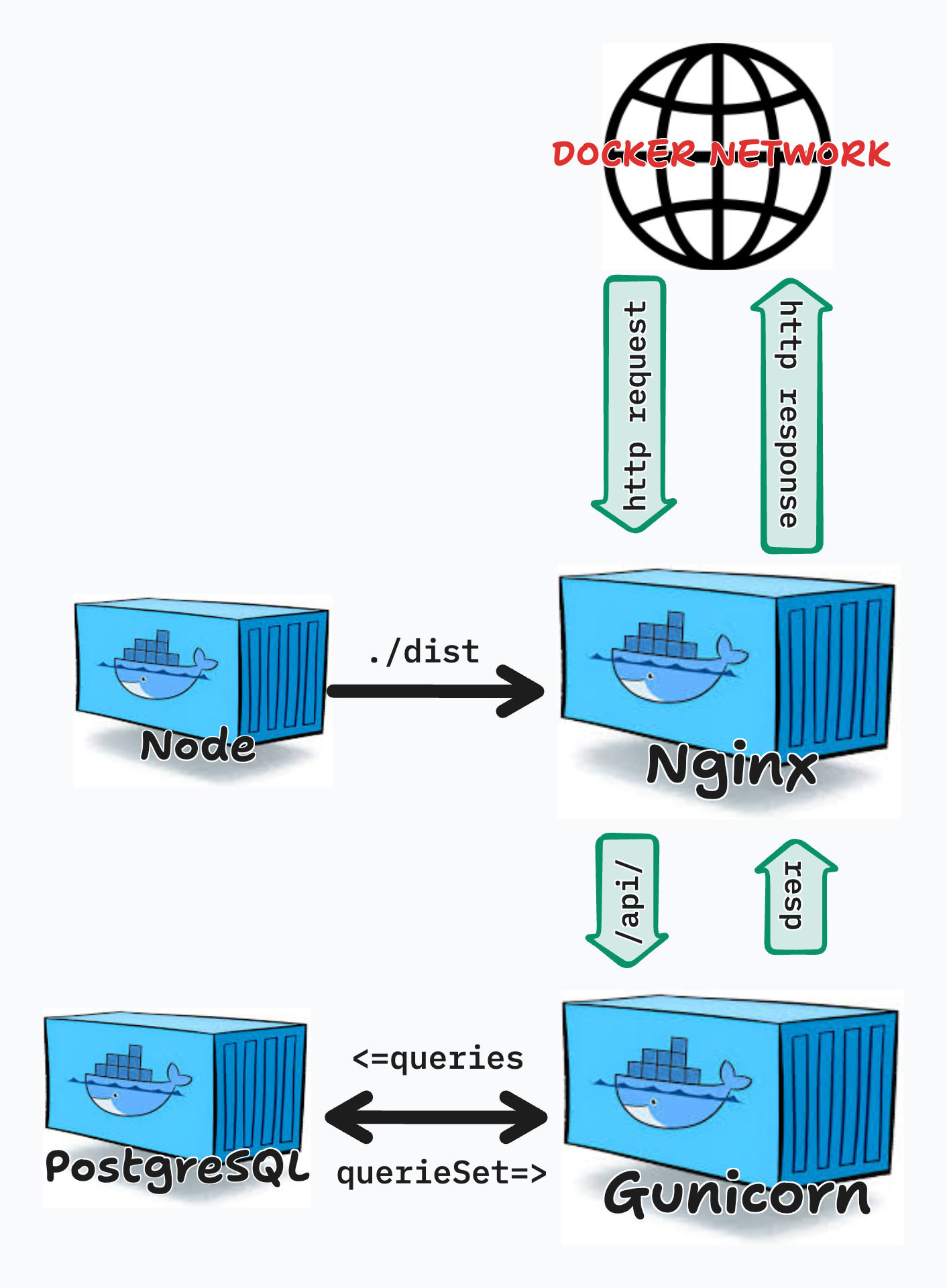
With the frontend now integrated into Docker Compose, the application operates as a complete full-stack system. Nginx serves optimized React assets, proxies API requests to Django, and provides a single entry point for users. Each service runs in isolation, communicates over a Docker network, and mirrors the boundaries you would expect in a real deployment. In the next stage of this project, we’ll focus on refining workflows, improving configuration management, and preparing this architecture for real-world deployment environments.